YouTube Multi View — Watch Multiple Streams at Once
Free YouTube multi view in your browser — watch multiple YouTube live streams side by side in one grid. No signup, no extension, up to 20 streams, works on any device.
or start with an empty grid and search for streamsHow to Use ViewGrid
Add Multiple Streams Instantly
Paste any stream URL — YouTube, Twitch, Kick or Rumble. ViewGrid detects the platform automatically.
Customize Your Grid Layout
Choose how many streams you want — from 1 up to 20 on desktop, up to 6 on mobile. The grid adapts to your screen.
Follow Your Favorite Streamers
Watch all your favorite streamers at once. Share your grid with friends via a unique link.
See It in Action
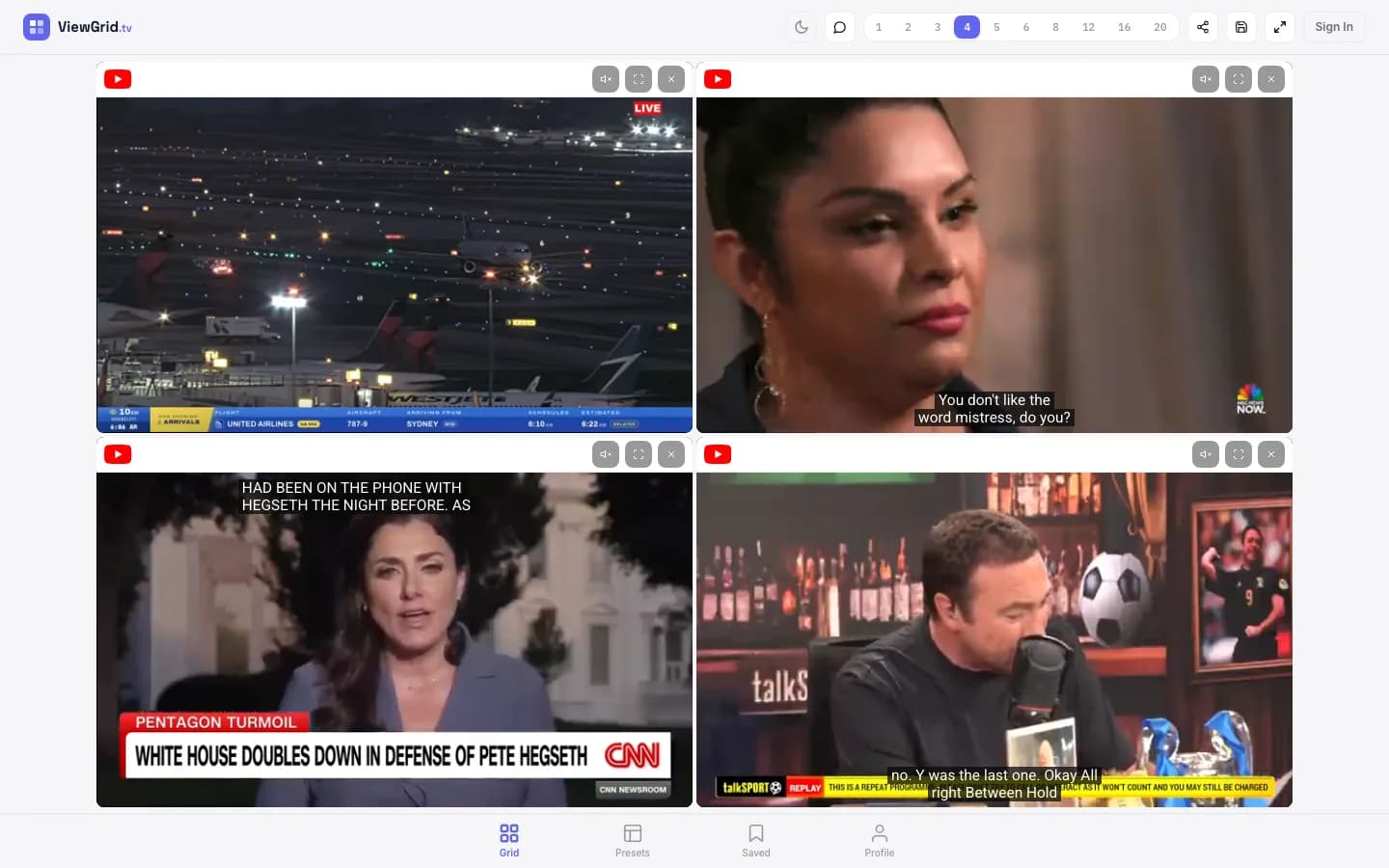
YouTube Multi View — Watch Several Videos in One Tab
If you've ever tried to follow more than one YouTube live stream, you know the usual routine: open a bunch of tabs, shrink them, drag windows around, and still miss half of what's happening. ViewGrid replaces that mess with a proper YouTube multi view — every video sits in its own slot on a single screen, playing at the same time, each with its own mute button.
The best part is that it runs entirely in your browser. There's no extension to install and no app to download, so it works the same on Chrome, Safari, Firefox and Edge. That makes ViewGrid a genuine multi view browser for YouTube: paste your links, pick a layout, and you instantly get a multi screen YouTube setup instead of juggling separate windows. It's the simplest way to watch multiple YouTube streams without cluttering your desktop.
People use it for all kinds of things — following two news channels during a breaking story, keeping a game walkthrough open next to a live event, or watching several creators premiere at once. Whatever the reason, a multi window YouTube layout that actually stays organized beats flipping between tabs every few seconds.
It is worth knowing where YouTube's own multiview stops. If you searched for YouTube multi view and found news about YouTube TV Multiview, that is a different product: a feature of the paid YouTube TV service. On YouTube itself, Google describes it as up to four live streams on one screen, offered through Primetime Channels — NFL Sunday Ticket, Peacock, Paramount+ and FOX One — with combinations that are mostly assembled for you. That is genuinely good if you are watching Sunday NFL games. But if the streams you care about are ordinary public channels — a rocket launch covered by three space channels, two language casts of the same esports final, four networks on one breaking story — none of it is eligible, and there is nothing to subscribe to that would make it eligible.
That is the gap ViewGrid fills. Paste any public YouTube link that allows embedding, build whatever combination you want, and go up to 20 slots on desktop or 6 on a phone. No subscription, no eligible-content list, no waiting for someone else to publish the multiview you had in mind.
Prefer to add streams while you browse YouTube? The free ViewGrid extension for Chrome (also for Edge and Firefox) adds the live stream you are watching to your grid in one click.
Updated October 2026
Getting the Most Out of Multi Screen YouTube
Skip the multi window juggling
Instead of resizing separate YouTube windows by hand, drop every link into one grid. ViewGrid keeps each video aligned and playing so nothing overlaps or gets lost behind another window.
Pick the right layout
Two videos side by side, a 2x2 grid, or up to 20 slots on desktop — choose a layout that matches how many YouTube streams you're following and your screen size.
Control audio per video
Every stream starts muted so you don't get a wall of noise. Unmute just the one you want to hear, or switch audio between videos as the action moves.
Works on your phone too
The same multi view youtube experience adapts to mobile, so you can watch a couple of streams stacked on a phone without installing anything.
YouTube events with free official streams
Frequently Asked Questions
How do I watch multiple YouTube streams at the same time?
Open viewgrid.tv/multi-stream in any browser and paste the YouTube links you want to follow: a regular video URL, a youtube.com/live link or a youtu.be short link. Each stream gets its own slot, and they all play at the same time in YouTube's own embedded player, each with its own mute and fullscreen controls. ViewGrid is free and needs no account, extension or download. You can add up to 20 streams on a desktop or laptop and up to 6 on a phone, then pick the layout that fits your screen. YouTube can be mixed with Twitch, Kick and Rumble in the same grid. The only videos that will not play are the ones whose owners have turned off embedding; those can only be watched on YouTube itself. To come back to the same streams later, keep the grid link or sign in for free and save the grid.
Is there a MultiTwitch-style viewer for YouTube?
Yes. Tools like MultiTwitch put several Twitch channels side by side, but they only work with Twitch. ViewGrid follows the same idea, one page with several live streams each in its own slot, and it works with YouTube as well. Paste YouTube video or live links, and Twitch, Kick or Rumble channels if you like, and they play together in one grid: up to 20 on desktop and 6 on mobile, free and without signing up.
Is there a multi view browser for YouTube?
ViewGrid works as a multi view browser for YouTube — no extension or download needed. Open viewgrid.tv in any browser (Chrome, Safari, Firefox, Edge), paste your YouTube links, and watch them all in one tab instead of juggling multiple windows.
How can I open YouTube in multi window or multi screen mode?
Instead of arranging separate YouTube windows manually, ViewGrid gives you a multi screen YouTube player in a single page: pick a grid layout (2, 4, 6 or more slots) and every video plays side by side with its own mute control.
Does ViewGrid work with YouTube premieres and live streams?
Yes. ViewGrid plays public YouTube videos, live streams and premieres through YouTube's own player. Just paste the URL. The only exception is a video whose owner has turned off embedding; those can only be watched on YouTube itself.
Can I mix YouTube and Twitch streams?
Absolutely! ViewGrid lets you watch YouTube, Twitch, Kick and Rumble streams all in the same grid.
Is ViewGrid the same as YouTube TV Multiview?
No. YouTube TV Multiview is part of the paid YouTube TV service in the US and shows up to four channels from that service. ViewGrid is free, needs no subscription, and works with any public YouTube live stream or video that allows embedding, plus Twitch, Kick and Rumble, up to 20 at once on desktop.
What is the difference between YouTube multiview and ViewGrid?
YouTube's own multiview shows up to four live streams and is limited to Primetime Channels such as NFL Sunday Ticket, Peacock, Paramount+ and FOX One, with mostly pre-built combinations. ViewGrid works with any public YouTube video or live stream that allows embedding, lets you choose the combination yourself, and goes up to 20 slots on desktop (6 on mobile) — free, in the browser, with no subscription.
Ready to Watch?
ViewGrid is a multistream viewer that lets you watch multiple live streams in one grid. Start watching now — it's free.
Create Your Grid