Twitch Squad or ViewGrid? Why Cross-Platform Wins
Tired of missing out? This post breaks down the limitations of Twitch Squad Stream and reveals why ViewGrid offers true cross-platform multi-stream power, letting you watch any stream, from any platform, all at once. The ultimate twitch squad alternative!
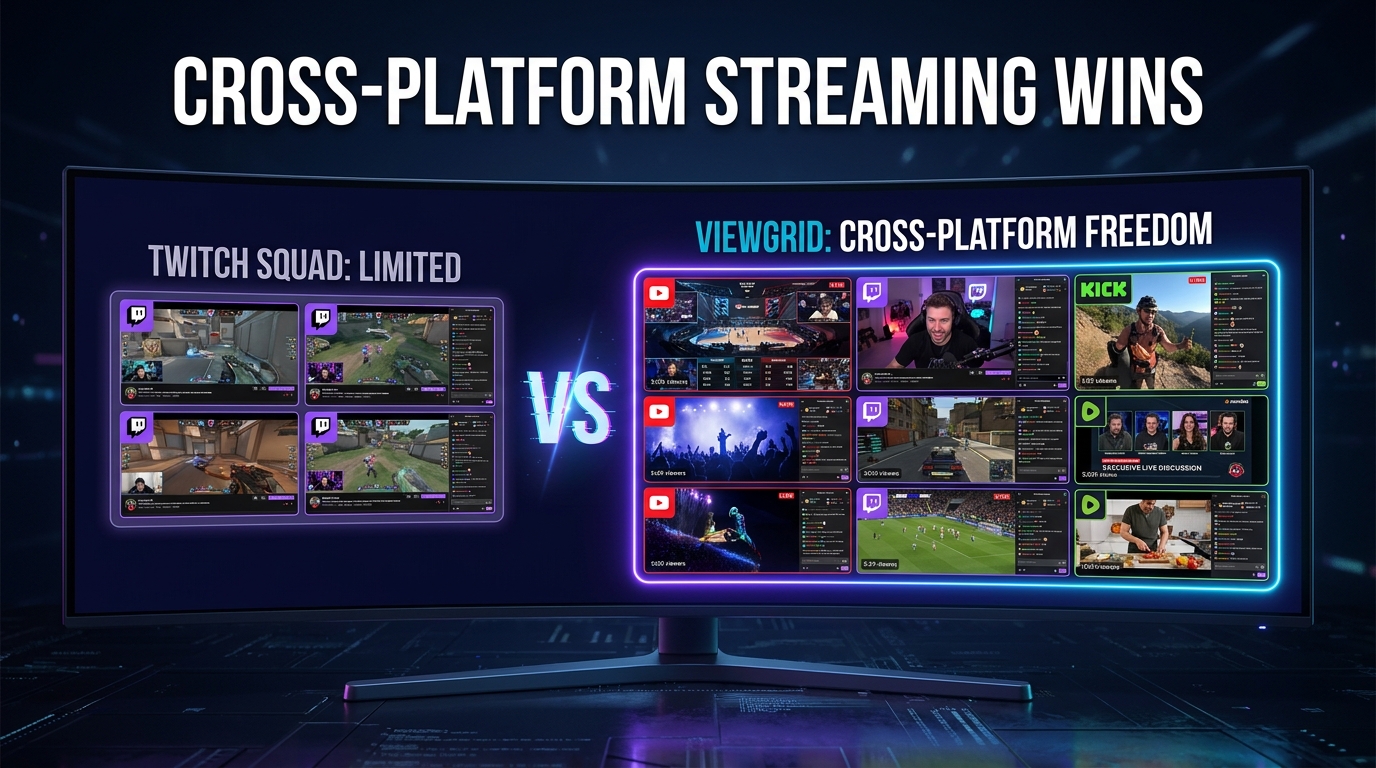
I spend a frankly ridiculous amount of time watching live streams. Seriously, multiple screens going, audio mixing, trying to keep up with my favorite creators — it's a daily ritual. And you know, for years, the dream was always to watch more than one thing at once. Like, how awesome would it be to catch the end of a nail-biting Escape from Tarkov raid from TheBurntPeanut while also keeping an eye on HasanAbi's reaction to the news? Or maybe have KaiCenat's "Just Chatting" stream up on one window, and then my buddy's small Project Zomboid playthrough on another?
The struggle, as they say, is real. For a while, Twitch Squad Stream seemed like the answer. It launched with a lot of hype, and I remember thinking, "Finally! This is it!" But after a fair bit of trying it out, both as a viewer and occasionally with friends, I quickly realized it wasn't quite the universal solution I was hoping for. It had its moments, sure, but the limitations became glaring. That's why I'm here today, talking about Twitch Squad Stream vs ViewGrid — because the difference for a true multi-platform viewer is night and day.
The Allure of Multi-Streaming: A Glorious Vision, Often Bound by Chains
Think about it: the internet is an ocean of live content. We've got esports, real-life adventures, deep dives into obscure games like Sid Meier's Civilization VII (shoutout to 加藤純一うん〇ちゃん with 14.5k viewers doing his thing right now!), political commentary, cooking shows, even virtual casinos with dona pulling in over 21k viewers. It's too much good stuff to pick just one.
So, the concept of multi-streaming is inherently appealing. You want to follow a major tournament, like the upcoming Formula 1 Heineken Dutch Grand Prix, and catch different camera angles or commentators simultaneously. Or maybe you've got friends who stream on different platforms — one on Twitch, one on YouTube, another on Kick — and you want to support them all without constantly tabbing back and forth. It's about being where the action is, all the action, without compromise.
When Twitch rolled out Squad Stream, it really felt like a step in the right direction. It was built-in to the platform, making it seem seamless. Streamers could invite others, and viewers could jump in and watch up to four perspectives at once, all within the Twitch ecosystem. And for certain scenarios, it works fine. If KaiCenat, Jynxzi, and xQc decided to all play Rust together and use Squad Stream, that would be pretty epic, wouldn't it? You could watch all their individual POVs right there. But that's where the magic kind of… stops. It's a closed garden, and sometimes, you just want to roam free.
Twitch Squad Stream: The Good, The Niche, and The "Please, Just Let Me Do What I Want"
Let's be fair, Twitch Squad Stream isn't bad. For what it is, it's pretty solid.
When Twitch Squad Stream Shines
If you're a streamer on Twitch, and you're playing a game with up to three other Twitch streamers, and your viewers primarily only want to see those specific perspectives, then yeah, it's pretty darn good. It's easy to set up for the streamer, and it keeps viewers engaged within the platform. You get synchronized chat, which is nice, and it feels very much like a unified event.
I've watched friends use it for co-op games or just "Just Chatting" sessions. It creates a cool, communal experience for that specific group. Like, if stableronaldo, Lacy, and jasontheween were all in the middle of their 🏀CORE 3V3 BASKETBALL TOURNEY🏀 right now and decided to squad up, that would be a natural fit. All their viewers could pick a perspective or watch all three, and it would make sense.
The Elephant in the Room: Limitations and Missed Opportunities
But here’s the thing, and this is where twitch squad stream vs viewgrid really highlights the core difference: Twitch Squad Stream is incredibly limited.
Twitch-Only: This is the big one. Huge. You can only watch Twitch streamers. If you want to watch KaiCenat on Twitch and, say, a cool tech review on YouTube, or a new indie game demo on Kick, you're out of luck. The system just doesn't allow for that kind of cross-platform multi-stream. It’s like having a fantastic car, but it can only drive on one specific type of road. What if I want to go off-road? Or to a different country?
Streamer-Initiated, Not Viewer-Driven: You, the viewer, don't get to choose who's in the squad. The streamers have to start it. This means if Jynxzi is playing The Last of Us Part I right now, and you also want to watch MOONMOON's Project Zomboid playthrough, you can't just throw them into a squad stream together because they're not actively "squad streaming." You're stuck opening multiple tabs and manually arranging them. That's a nightmare for audio alone.
Max Four Streams: Four is... fine. But sometimes you want more. What about a big esports event where there are six different POV streams, plus a main broadcast, plus an analyst desk? Or perhaps you're monitoring multiple news channels during a breaking event, which happens often for me. Four just doesn't cut it.
Rigid Layout: The layout options are pretty standard and not very customizable. You can pick who's the "main" view, but you can't freely resize, drag, and drop streams to fit your specific screen setup or viewing preference. I usually have one main stream large, and then 2-3 smaller ones tucked to the side, almost like a dashboard. Twitch Squad Stream doesn't let me do that.
So, while it's a neat feature for specific Twitch-only, streamer-organized collaborations, it falls short for anyone who wants true freedom and flexibility in their multi-streaming experience. And for someone like me, who bounces between platforms and creators constantly, it’s just not enough. It feels less like a multi-platform viewer and more like a glorified co-stream.
Pro Tip for Streamers: If you're using Twitch Squad Stream, make sure all your squad members have their stream titles and categories updated. It helps viewers know what they're seeing! You can find more details on Twitch's official help page: How to Use Squad Stream
ViewGrid: Unleashing the True Power of Cross-Platform Multi-Stream
This is where ViewGrid steps in and completely changes the game. Forget the limitations, the platform lock-ins, the need for streamers to coordinate. ViewGrid puts you in control. It's the ultimate twitch squad alternative because it doesn't care where the stream is from. Twitch? YouTube? Kick? Even some smaller, more niche platforms? Bring 'em on.
The first time I tried ViewGrid, I was immediately struck by the sheer freedom. I could finally create my perfect viewing experience, not one dictated by a platform or a streamer. I usually have a 34-inch ultrawide monitor, and I've always wanted to use that screen real estate to its maximum potential. With ViewGrid, I can actually do that. It's not just about watching multiple Twitch streams; it's about watching any stream, from any platform, all at once.
ViewGrid's Superpowers: Why It's the Ultimate Multi-Platform Viewer for Enthusiasts
Let's break down why ViewGrid isn't just a good option, but frankly, the only option for serious multi-streamers.
True Cross-Platform Multi-Stream: No Walls, Just Content
This is the big one. The absolute, undeniable killer feature. ViewGrid lets you pull streams from Twitch, YouTube, Kick, and more, and display them all on a single, customizable grid.
Imagine the upcoming Gamescom 2026. You might have the official Gamescom stream on YouTube for major announcements, then a specific developer's deep-dive panel live on Twitch, and maybe a gaming news channel on Kick reacting to everything. With Twitch Squad Stream, you couldn't even dream of this. With ViewGrid, it's just a few clicks. I can literally watch KaiCenat's "ANOTHER DAY ANOTHER STREAM" Just Chatting stream on Twitch (he's pulling 74k right now!) right next to a YouTube retrospective on an old game, or Bisteconee's IRL stream (22.5k viewers!) and some news coverage. It’s glorious. You want to Watch multiple Twitch streams? Great. You want to Watch multiple YouTube streams? Even better. How about Watch multiple Kick streams? Yep, that too. All at once, in one place. No more tab-hopping.
Total Control Over Your Layout: Your Streams, Your Rules
This is where the flexibility really shines. ViewGrid gives you complete command over how your streams are displayed.
Drag, Drop, Resize: You can drag any stream to any position on your grid. Want KaiCenat huge in the middle and Jynxzi in a smaller window below? Done. Want to line up four streams side-by-side perfectly? Easy. This granular control means you can tailor your viewing experience precisely to your screen size and what you want to focus on. Last week, I was watching the CORE 3V3 BASKETBALL TOURNEY with stableronaldo, Lacy, and PlaqueBoyMax, and I had their streams arranged in a vertical stack on the right side of my monitor, with a main game I was playing taking up the left. Perfect setup.
Audio Management: This is crucial. If you've ever tried to open multiple tabs and manage audio, you know the pain. ViewGrid lets you mute individual streams, adjust their volume independently, or even set one as the primary audio source with a single click. No more scrambling for the mute button when two streams suddenly get loud at the same time. This alone is a reason to make the switch from a chaotic tab system.
No Streamer Permission Needed (You're the Boss!)
Remember how Twitch Squad Stream requires streamers to initiate it? That's a non-issue with ViewGrid. You decide what to watch. You simply grab the URL of any live stream you want to see, paste it into ViewGrid, and add it to your layout. That’s it. You don't need anyone's permission, you don't need them to be in a "squad." You are the curator of your own multi-stream experience. This truly makes ViewGrid a superior twitch squad alternative because it gives the power directly to the viewer. It's about empowering your viewing choices.
Live Presets and Sharing: Instant Access to Your Favorite Combos
One of my absolute favorite features on ViewGrid is the ability to save live presets. What does this mean? It means if you spend time setting up the perfect arrangement of streams for, say, watching an F1 race (maybe the upcoming F1 Italian Grand Prix on September 4th!), you can save that entire layout as a preset. Then, next time, with just one click, all those streams pop up in their saved positions and sizes.
I have presets for specific gaming groups, for esports events, and even one for just "background noise" with a mix of Just Chatting streamers like xQc or HasanAbi and a calming music stream. It's incredibly convenient. Plus, you can share these presets with friends, which is awesome for coordinating group viewing sessions. Imagine setting up a preset for the US Open Tennis starting August 23rd, with the main courts and a few player-specific feeds, then sharing that link with your tennis-fan friends. They click it, and boom — they have your expert multi-stream setup instantly.
All these capabilities really underline ViewGrid's strength as a comprehensive ViewGrid multi-stream viewer. It's built for the modern, multi-platform, content-hungry viewer.
A Practical Guide: Setting Up Your Dream Multi-Stream View on ViewGrid
Okay, so this all sounds great, right? But how easy is it actually to get started? Super easy, trust me. Here’s a quick rundown of how you can create your custom multi-stream setup in minutes.
- Find Your Streams: Open the streams you want to watch in separate browser tabs, or just copy their URLs. Maybe you're looking at KaiCenat's stream, Jynxzi's The Last of Us playthrough, and Tumblurr's REMATCH stream — all on Twitch right now. Or maybe you're adding a YouTube news channel and a Kick IRL streamer like PlaqueBoyMax.
- Head to ViewGrid.tv: Open up ViewGrid.tv in your browser. You'll see a clean, empty canvas ready for your magic.
- Add Your First Stream: Paste the URL of your first stream into the input box (usually prominent on the page) and hit "Add Stream" or enter. The stream will appear on your grid.
- Add More Streams: Repeat step 3 for all the other streams you want to include. As you add them, ViewGrid will intelligently arrange them on your screen. Don't worry if the initial layout isn't perfect; we'll fix that next.
- Arrange and Resize: This is the fun part. Click and drag any stream window to move it around. See that little handle on the bottom-right corner of each stream? Click and drag that to resize the window exactly how you want it. Want one stream to take up 70% of the screen? You got it. Want four small streams along the bottom? No problem.
- Manage Audio: Hover over any stream, and you'll see audio controls. You can mute individual streams, adjust their volume, or set one as the "primary" audio (which helps to focus your sound). This is a lifesaver when you have a lot going on.
- Save as a Preset (Optional, but Recommended!): Once you've got your perfect layout, look for the "Save Preset" or similar button. Give your preset a name ("F1 Race Day," "Gaming Friends," "News Dashboard") and save it. Now, you can load this exact setup with a single click anytime you want.
- Share Your View (Also Optional!): ViewGrid often generates a unique URL for your specific multi-stream layout. Copy that URL and send it to your friends. They can open it and instantly see your curated multi-stream!
It's genuinely that straightforward. No downloads, no complicated software, just pure, customizable multi-stream goodness, live in your browser.
What's Happening Now & Next: Making the Most of ViewGrid for Live Events
One of the coolest things about a multi-platform viewer like ViewGrid is how it adapts to the ever-changing landscape of live content. Right now, as I'm writing this on August 19, 2026, there’s a ton of action. KaiCenat is holding court with over 74,000 viewers in "Just Chatting." Tumblurr's "REMATCH" has over 45,000 watching. You've got Jynxzi deeply immersed in The Last of Us Part I, and Maximum is kicking off day 1 of a World of Warcraft Race to World First. And then there’s HasanAbi reacting to news, xQc doing… well, xQc things with his signature stream title, and MOONMOON surviving in Project Zomboid.
With ViewGrid, you're not forced to pick just one. You could have KaiCenat and HasanAbi side-by-side for your "Just Chatting" fix, while keeping an eye on Jynxzi's The Last of Us in a smaller window. Or, if you're into esports, you could be watching Maximum's WoW progress alongside another Escape from Tarkov streamer like TheBurntPeanut. The possibilities are endless, and you can mix and match across platforms.
And looking ahead, the calendar is packed!
Formula 1 Heineken Dutch Grand Prix 2026 (starts Aug 21): This is perfect for multi-streaming. You could have the main broadcast on one screen, an onboard camera feed from your favorite driver on another (if available on different channels), and maybe a live timing screen or a commentator stream. We even have a full guide for it: /blog/formula-1-heineken-dutch-grand-prix-2026-multi-stream-guide.
US Open Tennis (starts Aug 23): Multiple courts, multiple matches, all happening at once. You can't watch it all on one tab! With ViewGrid, you can have a few key matches up simultaneously. Check out our guide here: /blog/us-open-tennis-multi-stream-guide.
Gamescom 2026 (starts Aug 25): New game reveals, interviews, live demos. You'll want to watch the main stage, specific publisher streams, and maybe a Twitch streamer reacting live. Our guide is ready: /blog/gamescom-2026-multi-stream-guide.
Partial Lunar Eclipse (starts Aug 28): How cool would it be to watch different telescopes streaming from different parts of the world, all at once? Science streams often pop up on YouTube or Twitch.
FIBA Women's Basketball World Cup 2026 (starts Sep 4): Another fantastic sporting event to track multiple games simultaneously.
Formula 1 Pirelli Gran Premio d'Italia 2026 (starts Sep 4): More F1 action, more multi-stream opportunities!
For any of these major events, or even just your daily dose of content, ViewGrid empowers you to catch everything that matters to you. Whether it's Watch multiple esports streams, Watch multiple sports streams, or keeping up with Watch multiple news channels, ViewGrid is your command center.
Final Thoughts: Your Viewing Experience, Unleashed
When it comes down to it, the comparison between Twitch Squad Stream vs ViewGrid isn't really a fair fight if you value freedom and control. Twitch Squad Stream is a neat little feature for a very specific, limited use case within Twitch. It's like a nice, cozy little club. But ViewGrid? ViewGrid is the entire festival, and you're the headliner deciding which stages to watch, how loud they are, and where they're positioned.
For me, a true streaming enthusiast, the ability to curate my own cross-platform multi-stream setup is non-negotiable. I don't want to be told what I can and can't watch together. I want to mix my gaming, my news, my sports, and my entertainment exactly how I want it, when I want it. That's the power of being a multi-platform viewer.
If you're tired of missing out, tired of juggling tabs, or just want to take full control of your live stream viewing, give ViewGrid.tv a try. It genuinely changed how I consume live content, and I'm pretty sure it'll do the same for you. It's not just about watching more; it's about watching smarter, and exactly the way you want to.
Ready to try multi-stream viewing?
Watch YouTube, Twitch, Kick & more — all on one screen.
Open ViewGridRelated Articles
Multi-Stream: Browser Extension or Web App?
Which is better for multi-streaming? We break down the multi-stream browser extension vs web app debate, highlighting performance, flexibility, and why web apps win for serious streamers.
comparisonWhat Makes the Best Multi Stream Viewer? ViewGrid's Edge
Tired of juggling tabs? Find out what truly defines the best multi stream viewer, from essential audio control to flexible layouts. I'll break down how to choose and why ViewGrid.tv makes multi-streaming a breeze.
comparisonKick Multi-Stream: ViewGrid's Ultimate Viewer
Tired of juggling tabs to watch Kick? Discover how ViewGrid.tv provides the best kick multi stream experience, letting you watch multiple Kick streams and more, all in one place.
comparisonBest Multi Stream Viewer for YouTube, Twitch, Kick & Rumble
Tired of juggling tabs? Find out what makes the best multi stream viewer shine. I break down essential features, share personal experiences, and guide you to an ultimate multi-platform setup.